
상점에서 선택한 아이템을 제대로 알 수 없어 불편한 문제가 있었다.
그래서 선택한 아이템의 이미지를 진하게 하여 강조하는 기능을 만들기로 했다.
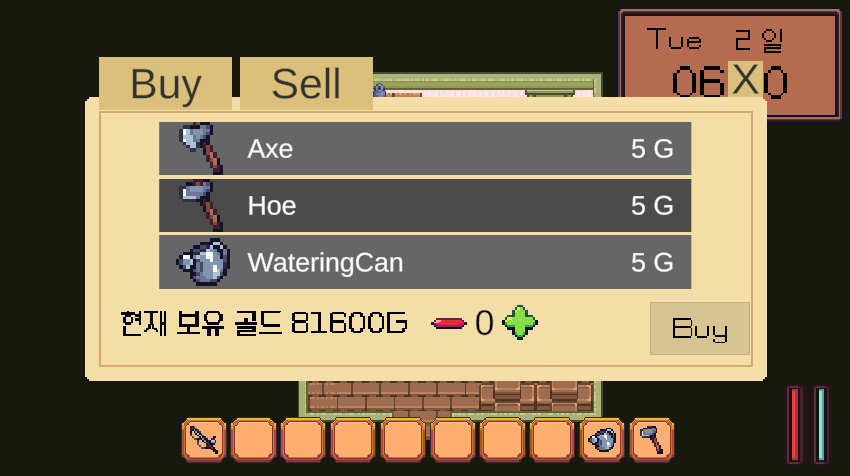

색을 변하게 하는 거야, 각 아이템 판넬의 Image의 color를 변경하면 되는 거라 생각했는데,
문제는 어떻게 변경하는 것이 좋을지 였다.
// ShopSystem의 메서드
public void SelectSellingItem(int p_index)
{
    if (_sellPanels[p_index].ItemSO == null)
    {
        _itemInformationPanel.ResetText();
        return;
    }
    _selectedItemIndex = p_index;
    _itemInformationPanel.SetText(_sellPanels[p_index].ItemSO, true);
}

// SellingItemPanel의 메서드
public void SetSellItem()
{
    _shopSystem.SelectSellingItem(_slotIndex);
}

// ------------------------------------

// ShopSystem의 메서드
public void SelectBuyingItem(int p_index)
{
    _selectedItemIndex = p_index;
    _itemInformationPanel.SetText(_stockPanels[p_index].ItemSO, false);
}

// ShopStockPanel의 메서드
public void SetBuyItem()
{
    _shopSystem.SelectBuyingItem(_slotIndex);
}
현재 시스템에서 '아이템을 선택하는 것'은 각 아이템 panel에서 Shop System에 있는 위 메서드를 호출하여 Shop System의 _selectedItemIndex를 변경하는 것으로 구현되었다.
그럼 이제 상황을 만들었을 때, 0번 판넬을 클릭해서 _selectedItemIndex를 0으로 만들고, 어떻게든 0번 판넬의 색을 바꿨다고 해보자,
이제 다음에 1번 판넬을 클릭했을 때도 _selectedItemIndex는 1이 되고, 1번 판넬의 색도 바뀔 것이다.
그런데 0번 판넬은 내가 1번 판넬을 클릭한 것을 어떻게 알 수 있는가?
위 질문이 이 기능을 구현할 때 고민이 많이 된 부분이었다.
고민 끝에 ShopSystem의 이벤트에 각 판넬의 색을 바꾸는 메서드를 구독하고, 선택시 해당 이벤트를 실행시켜, 결과적으로 1번 판넬을 선택해도 0번 판넬의 색을 바꾸는 메서드도 실행할 수 있도록 하는 방법을 생각해 냈다.
구매창에 판매창에서 사용되는 아이템 오브젝트들은 각각 ShopStockPanel과 SellingItemPanel이라는 스크립트며, 공통적으로 ShopItemPanel이라는 추상클래스를 상속받도록 했기에, ShopItemPanel를 다음과 같이 변경했다.
public abstract class ShopItemPanel : MonoBehaviour
{
    [SerializeField] protected Image _panel;
    [SerializeField] protected Image _itemIcon;
    protected ItemSO _itemSO;

    protected int _slotIndex;

    protected ShopSystem _shopSystem;

    protected Color _defaultColor;
    protected Color _selectedColor;

    public ItemSO ItemSO { get { return _itemSO; } }

    public void SetIndex(int p_index)
    {
        _slotIndex = p_index;
    }

    protected void ToggleSelect()
    {
        if (_defaultColor == null || _selectedColor == null) return;

        _panel.color = _shopSystem.GetSelectedItemIndex() == _slotIndex ? _selectedColor : _defaultColor;
    }
}
그리고 ShopItemPanel에서 ShopSystem에서 선택된 아이템의 인덱스 일치 여부에 따라 _panel의 color를 변경하는 코드를 작성했다.
// 설명에 불필요한 부분은 삭제했다
public class ShopStockPanel : ShopItemPanel
{
    private void Awake()
    {
        _defaultColor = new Color(0.4f, 0.4f, 0.4f);
        _selectedColor = new Color(0.3f, 0.3f, 0.3f);
    }

    public void SetShopStock(ItemSO p_itemSO, ShopSystem p_shopSystem)
    {
        _shopSystem = p_shopSystem;
        _shopSystem.OnBuySelect += ToggleSelect;
    }

    public void ReleaseStock()
    {
        _shopSystem.OnBuySelect -= ToggleSelect;
        gameObject.SetActive(false);
    }

    public void SetBuyItem()
    {
        _shopSystem.SelectBuyingItem(_slotIndex);
    }
}
// 설명에 불필요한 부분은 삭제했다.
public class SellingItemPanel : ShopItemPanel
{
    private void Awake()
    {
        _defaultColor = new Color(1f, 1f, 1f);
        _selectedColor = new Color(0.8f, 0.8f, 0.8f);
    }

    public void SetSellingItem(int p_index, ShopSystem p_shopSystem)
    {
        _shopSystem = p_shopSystem;

        _shopSystem.OnSellSelect -= ToggleSelect;
        _shopSystem.OnSellSelect += ToggleSelect;
    }

    public void SetSellItem()
    {
        _shopSystem.SelectSellingItem(_slotIndex);
    }
}
그리고 각 스크립트에서는 Awake에서 기본 색과 선택했을 때의 색을 설정하고,
색을 교체하는 메서드를 ShopSystem의 이벤트에 구독시켰다.
ShopStockPanel의 경우, '상점'창이 활성화 될 때와, 비활성화 될 때가 명확하여 구독과 구독해지를 각 메서드에 나눴지만,
SellingItemPanel의 경우에는 '판매'창이 활성화 되거나, 판매한 뒤에도 SetSellingItem이 실행되므로, 구독 전에 구독을 해지하는 메서드를 넣었다.
그리고 각각 클래스에 있는 SetXXItem은 Button 컴포넌트에서 실행하는 메서드로, 해당 판넬을 클릭시 호출된다.
public void SelectSellingItem(int p_index)
{
    if (p_index >= 0)
    {
        if (_sellPanels[p_index].ItemSO == null)
        {
            _itemInformationPanel.ResetText();
        }
        else
        {
            _itemInformationPanel.SetText(_sellPanels[p_index].ItemSO, true);
        }
    }
    _selectedItemIndex = p_index;
    OnSellSelect?.Invoke();
}

public void SelectBuyingItem(int p_index)
{
    if (p_index >= 0)
    {
        _itemInformationPanel.SetText(_stockPanels[p_index].ItemSO, false);
    }
    _selectedItemIndex = p_index;
    OnBuySelect?.Invoke();
}
그리고 해당 메서드에서 이벤트를 동작시켜, 각 판넬들의 구독된 ToggleSelect 메서드를 동작시킬 수 있었다.
현재 개선이 필요하다고 생각드는 부분은, '모든 판넬의 ToggleSelect가 실행된다'는 점이다.
사실상 필요한 건 선택한 판넬과, (있었다면)선택됐던 판넬의 ToggleSelect 뿐이지만, 현재는 모든 판넬의 ToggleSelect가 실행되고 있다.
비록 각 판넬의 갯수가 그렇게 많지 않더라도, 개선이 가능하다면 개선하는 것이 좋아보이는 부분이다.
'내일배움캠프 TIL' 카테고리의 다른 글
| 내일배움캠프 78일차 TIL "퀘스트 기능" (0) | 2025.01.08 |
|---|---|
| 내일배움캠프 77일차 TIL "ToggleSelect 관련 개선" (0) | 2025.01.07 |
| 내일배움캠프 75일차 TIL "추상클래스의 이용" (0) | 2025.01.03 |
| 내일배움캠프 74일차 TIL "Sprite atlas 관련 이슈 해결" (0) | 2025.01.02 |
| 내일배움캠프 73일차 TIL "취침 및 강제 취침 관련 아이디어" (0) | 2024.12.31 |